
Learn Sight Read Music Tutor
Overview
Learn Sight Read Music Tutor is a dedicated tool designed to enhance musical literacy by improving users’ ability to read and interpret sheet music in real time. The application targets musicians of all skill levels, from beginners exploring basic note recognition to more advanced players refining their sight reading proficiency. Developed by Alain Kong, the app focuses on practical, hands-on learning through interactive exercises that simulate real-world reading scenarios. Its primary function is to help users identify musical notes quickly and accurately across both G and F clefs, with randomly generated note sequences that avoid repetition, ensuring varied and comprehensive practice. This dynamic approach supports consistent skill development without relying on predictable patterns.
Users can customize their learning experience by selecting between different clefs, adjusting octave ranges for beginners, and choosing from multiple notation systems—standard (C D E F G A B), European (C D E F G A H), and solfège (Do Ré Mi Fa Sol La Si). The inclusion of major and minor scales with sharps and flats adds depth to the learning process, enabling users to practice complex harmonic structures. Additionally, alternate instrument sounds such as guitar, organ, and trumpet allow for auditory customization, helping users associate notes with different timbres. The app also provides immediate feedback when a note is missed, displaying the correct answer to reinforce learning. These features make it suitable for pianists, guitarists, and other instrumentalists aiming to strengthen their foundational music reading skills.
Key Features & Capabilities
- Dynamic Note Generation – Notes are generated randomly across G and F clefs without repeating sets, offering diverse practice sessions that simulate real performance conditions.
- Clef Switching – Users can toggle between G and F clefs to build adaptability and confidence in reading different staff notations.
- Octave Limiting for Beginners – A customizable range option allows new learners to focus on a manageable set of notes, reducing cognitive load during early stages of learning.
- Multiple Notation Systems – Supports standard, European, and solfège notation, accommodating various educational preferences and regional practices.
- Scale Practice – Includes major and minor scales with sharps and flats, enabling users to train their ear and eye coordination across complex harmonic patterns.
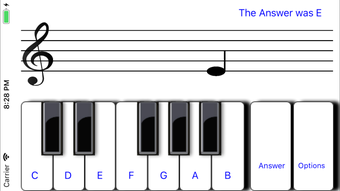
- Immediate Feedback – When a note is missed, the app displays the correct answer, promoting error correction and reinforcing accurate recognition.
- Customizable Instrument Sounds – Offers alternate audio outputs such as guitar, organ, and trumpet, allowing users to hear notes through different timbres for enhanced auditory association.
- Performance Tracking – Tracks test scores and performance statistics, providing insight into progress over time and helping users identify areas for improvement.
These capabilities support a structured yet flexible learning path. For example, a beginner might start with limited octaves and standard notation, gradually advancing to full-range practice with solfège. An experienced musician could use the app to sharpen speed and accuracy under pressure, leveraging the app’s fast-paced mode.
The ability to switch between clefs and notation systems also makes it ideal for students preparing for music theory exams or ensemble auditions. The inclusion of scale practice reinforces theoretical knowledge while building practical reading fluency. Overall, the app’s feature set is tailored to bridge the gap between theoretical understanding and real-time application in musical performance.
User Interface, Workflow & Performance
The user interface is designed with simplicity and clarity in mind, featuring a clean layout that prioritizes readability and ease of interaction. The main screen displays musical notes on a staff, with intuitive controls for selecting clefs, adjusting settings, and starting practice sessions. Navigation is straightforward, allowing users to access key functions with minimal clicks. The workflow follows a logical sequence: choose settings, begin practice, receive feedback, and review performance data—ensuring a smooth and focused learning experience.
Users can expect a responsive interface that adapts to touch input on iPhone devices, with visual cues and auditory feedback synchronized to enhance engagement. The app’s performance is optimized for mobile use, maintaining consistent frame rates during note presentation and response handling. The developer did not specify resource usage details, but based on its 28.3 MB size and mobile platform, it is likely to operate efficiently on modern iOS devices without excessive battery drain or memory strain. Stability appears reliable, with no reported issues in the provided information. Performance observations are based on general software behavior patterns.
Compatibility & System Requirements
Learn Sight Read Music Tutor is designed exclusively for iPhone devices, ensuring compatibility with the iOS ecosystem. It runs on iOS 14 or later, as specified in the release information. The application requires approximately 28.3 MB of storage space, which is a modest footprint for a functional educational tool. The developer did not provide additional system requirements, such as CPU or RAM specifications, nor did they detail supported iPhone models beyond the operating system compatibility.
Platform compatibility information is limited to the iOS platform and version. Users should ensure their device meets the minimum OS requirement to install and run the app. While no hardware-specific details were included, the app’s lightweight nature suggests it will function on most iPhone models released in the past several years. Exact system requirements were not listed, and compatibility with older devices or other platforms remains unconfirmed.
Pros and Cons
Pros
- Free to download and use with no hidden costs
- Supports multiple notation systems and clef types for diverse learning needs
- Offers dynamic, non-repeating note generation for varied practice
- Provides immediate feedback and performance tracking for self-assessment
- Customizable instrument sounds enhance auditory learning
- Beginner-friendly settings with octave limiting and adjustable difficulty
- Lightweight at 28.3 MB, suitable for mobile devices with limited storage
Cons
- Exclusive to iPhone; no support for iPad or other platforms
- Limited to iOS; no version available for Android or desktop systems
- Exact performance metrics and hardware requirements were not specified
- No offline mode mentioned in provided information
- App lacks integration with external music notation software or cloud sync
FAQ Section
Is Learn Sight Read Music Tutor available for Android?
The app is currently only available for iPhone and runs exclusively on iOS. There is no version available for Android devices.
Can I use the app offline?
Information about offline functionality was not provided. The app may require internet access for certain features, though core practice tools may function without connectivity.
Does the app support iPad devices?
The app is designed for iPhone and has not been confirmed to work on iPad. Users should verify compatibility through the App Store before downloading.
What types of music notation does the app support?
The app supports three notation systems: standard (C D E F G A B), European (C D E F G A H), and solfège (Do Ré Mi Fa Sol La Si).
Is there a license or subscription required to use the app?
Learn Sight Read Music Tutor is completely free to use with no subscription or in-app purchases required.
Final Thoughts + CTA
Learn Sight Read Music Tutor stands out as a focused, accessible tool for musicians seeking to improve their sight reading abilities. Its combination of dynamic note generation, multiple notation systems, and immediate feedback creates a robust learning environment tailored to both beginners and experienced players. The app’s lightweight design and free access make it an ideal choice for students, educators, and hobbyists alike. While its exclusive iPhone availability and lack of cross-platform support are limitations, its core functionality remains strong and purpose-built.
For anyone looking to build confidence in reading sheet music, enhance note recognition speed, or prepare for musical assessments, this app delivers tangible value. Its intuitive workflow, customizable settings, and performance tracking ensure a meaningful and measurable learning journey. Whether you're a pianist, guitarist, or another instrumentalist, the app provides a practical way to strengthen foundational skills.
Download Learn Sight Read Music Tutor now







